To optimize a Google Business Profile, make sure every field is complete and accurate, choose the most precise primary category, list each service with a description, upload real photos, collect and reply to reviews every week, and keep hours and updates current. A complete, active profile ranks higher and turns more views into calls.
Your Google Business Profile is often the first thing a new customer sees, before your website and before they speak to you. Use this checklist from top to bottom. Each step is quick on its own, and together they make a big difference.

Setup and basics
1. Verify the profile
An unverified profile cannot rank properly and can be edited by others. If you see “Get verified” in your profile, finish that first.
2. Use your real business name
Use the name on your signage, invoices and website. Adding cities or keywords to the name is against Google’s guidelines and is a common reason for suspensions.
3. Set your address or service areas correctly
If customers visit you, show your address. If you travel to customers, such as plumbers or cleaners, hide the address and list the areas you serve instead.
4. Add a local phone number and your website
Use the number that is answered during opening hours, and link to the most relevant page of your website. For a single-location business that is usually the home page.
5. Keep hours accurate, including holidays
Wrong hours lead to angry calls and bad reviews. Add special hours before every public holiday.
Categories and services
6. Choose the most precise primary category
This is one of the strongest signals for which searches you appear in. Look at the businesses already ranking in the Maps 3-pack for your main keyword and compare their categories with yours. Our 3-pack ranking guide explains why this matters so much.
7. Add relevant secondary categories
Add categories for other services you really provide. Do not add categories for work you do not do, because it can make your profile look less relevant.
8. List every service with a short description
Write one or two plain sentences for each service: what it is, who it is for and what is included. This content helps both Google and the new AI answers on Maps understand what you offer.
9. Write a clear business description
Explain what you do, where you work and what makes you different in simple language. Avoid long lists of keywords. Write it for a customer, not for a robot.

Photos, reviews and trust
10. Upload real photos regularly
Add your logo, a cover photo, your team, your premises or vehicles, and before-and-after photos of real jobs. Stock photos do not build trust.
11. Ask for reviews after every job
Send a short message with your direct review link the same day. A steady flow of recent reviews matters more than a big batch once a year.
12. Reply to every review
Thank happy customers by name and mention the service. For negative reviews, stay calm, apologise where it is fair and offer to solve the problem offline. Future customers read your replies.
Activity and accuracy
13. Publish updates
Share recent work, offers and seasonal tips. Updates show that the business is active and give customers another reason to call.
14. Answer common questions on your website
Google is replacing the old Q&A section on Maps with an AI “Ask” feature that builds answers from your profile, reviews and website. Add a clear FAQ to your website and service pages so the answers Google gives about you are correct.
15. Check for edits and duplicates every month
Anyone can suggest changes to a profile, and Google sometimes accepts them. Check your details monthly and remove duplicate listings for the same location.
How to measure if it is working
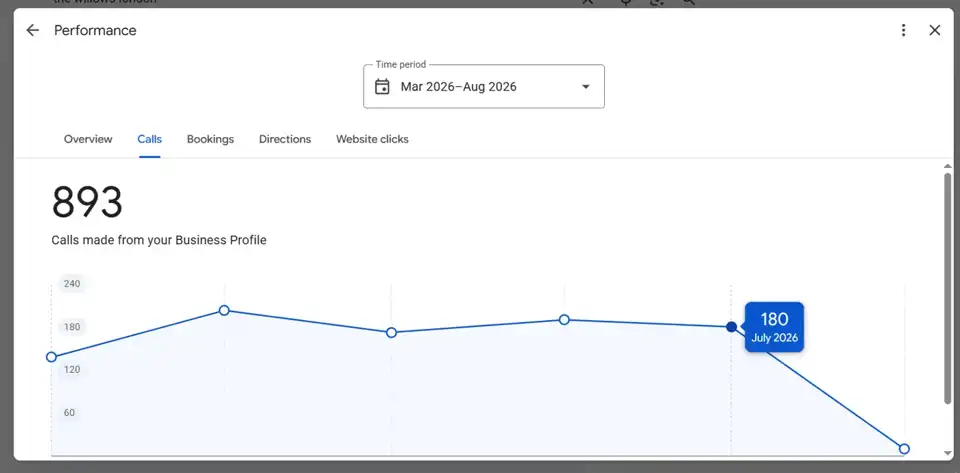
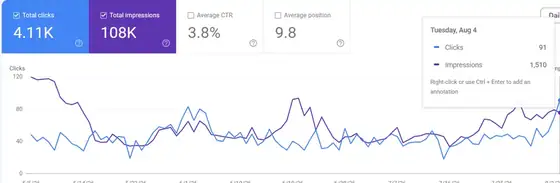
Inside your Business Profile, open Performance and watch three numbers: calls, website clicks and direction requests. These matter more than views. For example, The Willows in London received 893 calls and over 18,000 interactions from its profile in six months. See the screenshots on our results page.
Want a second pair of eyes?
Our Google Business Profile service covers all fifteen steps every month. If you would like to know where your profile stands today, request a free audit.
Frequently asked questions
Complete every field, choose the most precise primary category, list each service with a description, upload real photos, collect and reply to reviews, keep hours current and publish regular updates.
No. Google requires your real business name. Adding keywords or locations to the name breaks the guidelines and can lead to a suspension.
Check details monthly, add photos and updates every week or two, and ask for reviews after every job.
Google is replacing the Q&A section on Maps with an AI-powered Ask feature that answers questions using your profile, reviews and website, so clear FAQ content on your website matters more.

Nadir leads strategy and Local SEO for every RankQora client, from first audit to rankings and calls.
More about our team